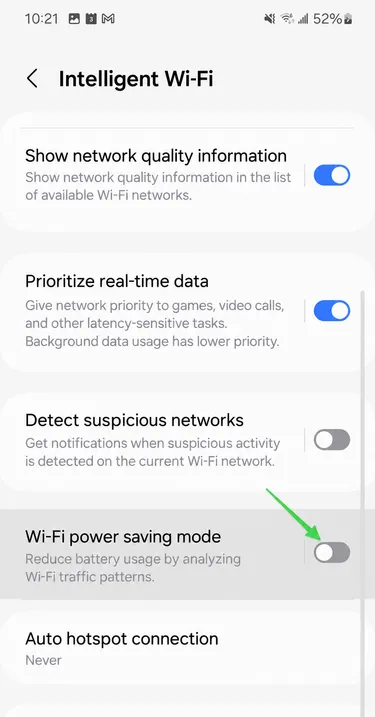
Smart Wi-Fi Usage Reduction
The Problem
Section titled “The Problem”Wi-Fi power saving mode reduces how often your phone communicates with the Wi-Fi network when the screen is off or the device is idle. This can delay your notifications.
The Solution
Section titled “The Solution”To turn this mode off:
-
Go to Settings, then to the Connections section
Section titled “Go to Settings, then to the Connections section”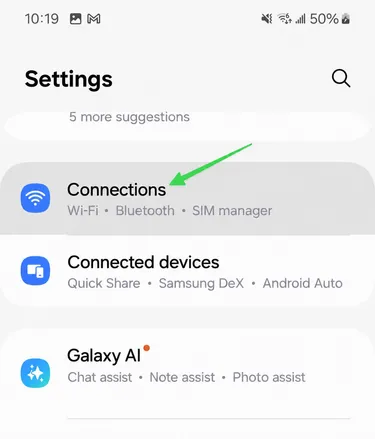
-
Go to the Wi-Fi section
Section titled “Go to the Wi-Fi section”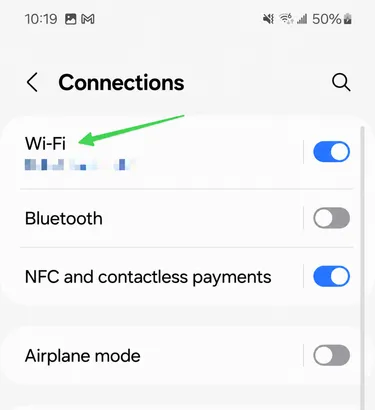
-
Tap the three dots at the top right, then Advanced settings
Section titled “Tap the three dots at the top right, then Advanced settings”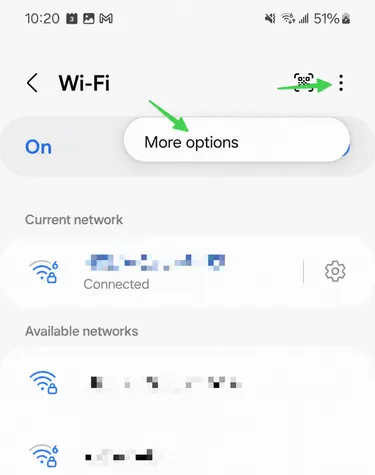
-
Then tap Intelligent Wi-Fi
Section titled “Then tap Intelligent Wi-Fi”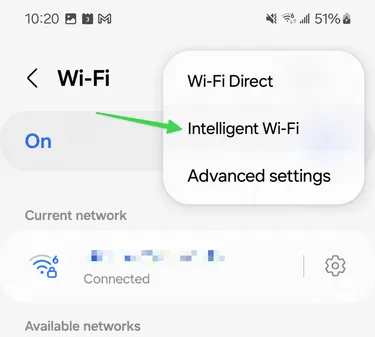
-
Turn off Wi-Fi power saving mode
Section titled “Turn off Wi-Fi power saving mode”