

Deploy Braver Independently
Configure your organization in just 7 steps!
Here are the steps to set up your organization in Braver:
Section titled “Here are the steps to set up your organization in Braver:”-
Define Your Organization Structure
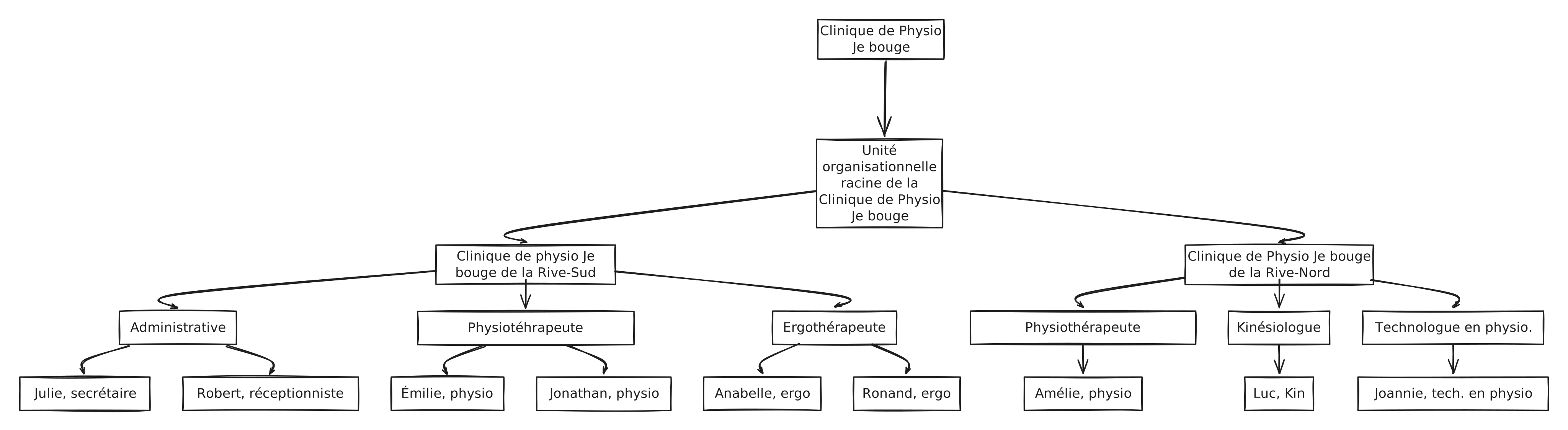
Section titled “Define Your Organization Structure”If you are using Braver independently and are not sure about the best structure for your organization, let us help you.
Here is a concrete example of a healthcare organization structure:
-
Submit an Organization Creation Request
Section titled “Submit an Organization Creation Request”- Share your organization’s name with the Braver team using the following form
- Wait for a Braver team member to contact you for the next steps
-
Access the Administrative Application
Section titled “Access the Administrative Application”You can access the administrative application via https://admin.braver.net. Use the same credentials as those for logging into your Braver account (email + password)
-
Create Your Organizational Units
Section titled “Create Your Organizational Units”Here is how to create an organizational unit.
If you are not familiar with the concept of organizational unit, here is the documentation.
-
Create Your Workplaces
Section titled “Create Your Workplaces”Here is how to create a workplace.
If you are not familiar with the concept of workplace, here is the documentation.
-
Create Your Teams
Section titled “Create Your Teams”Here is how to create a team.
If you are not familiar with the concept of team, here is the documentation.
-
Send User Invitations
Section titled “Send User Invitations”Before sending user invitations, it is very important to understand what roles and permissions you will grant them. Here is the documentation to help you.
You are now ready to send user invitations. Here is how to invite a user.