Delete Your Braver Account
Step by Step
Section titled “Step by Step”-
Select the badge with your photo or initials to access your profile, then click on your name.
Section titled “Select the badge with your photo or initials to access your profile, then click on your name.”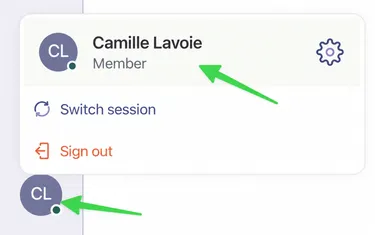
-
Click on the Settings tab.
Section titled “Click on the Settings tab.”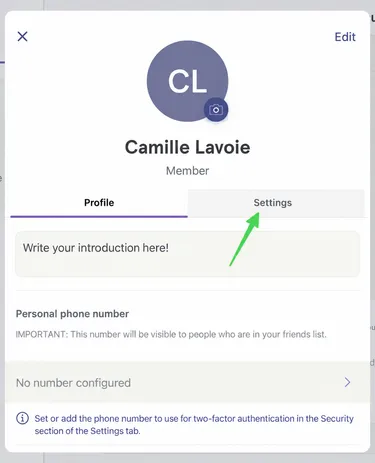
-
At the bottom of the page, go to Delete Your Account.
Section titled “At the bottom of the page, go to Delete Your Account.”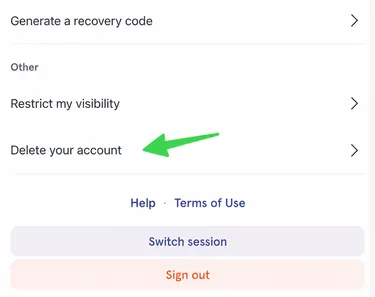
-
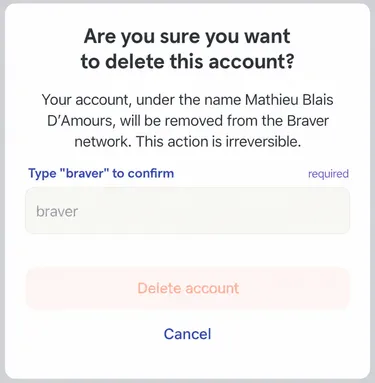
Click on Delete Account.
Section titled “Click on Delete Account.”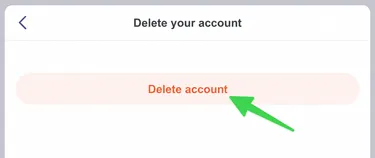
-
Write braver in the appropriate space and confirm by clicking Delete Account one last time.
Section titled “Write braver in the appropriate space and confirm by clicking Delete Account one last time.”