Finding a Closed Discussion Thread
Step-by-Step
Section titled “Step-by-Step”-
Access the care team of your choice.
Section titled “Access the care team of your choice.”
-
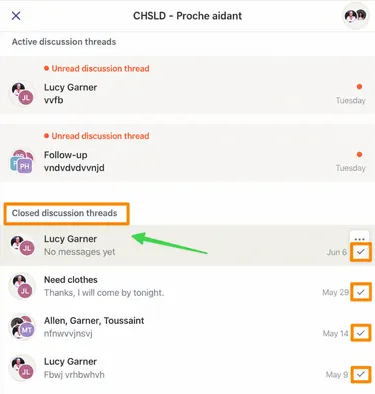
The page of your care team is divided into 2 sections (see orange boxes)
Section titled “The page of your care team is divided into 2 sections (see orange boxes)”- Active Discussion Threads
- Closed Discussion Threads
Note that each closed discussion thread is marked with a checkmark.
Click on the closed discussion thread that interests you.
-
You have access to the entire discussion and attachments (paperclip at top right), if applicable.
Section titled “You have access to the entire discussion and attachments (paperclip at top right), if applicable.”Note that the closed discussion thread displays the mention: The discussion thread has been closed and it is impossible to add content to it. (See orange box at bottom of screen)