Write to a Team
Step-by-Step
Section titled “Step-by-Step”-
Start a new discussion thread by clicking on the bubble on the home page.
Section titled “Start a new discussion thread by clicking on the bubble on the home page.”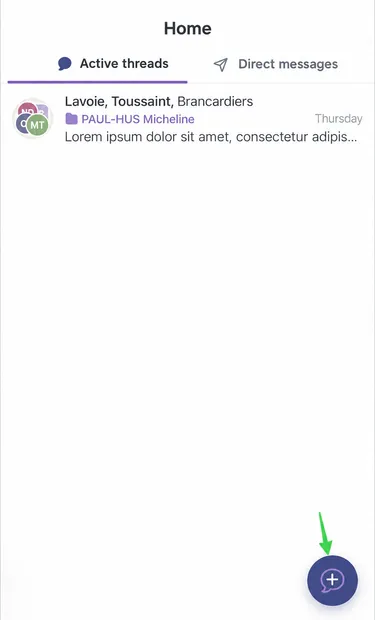
-
Choose the type of discussion thread that suits you, then in the participants section, click Invite.
Section titled “Choose the type of discussion thread that suits you, then in the participants section, click Invite.”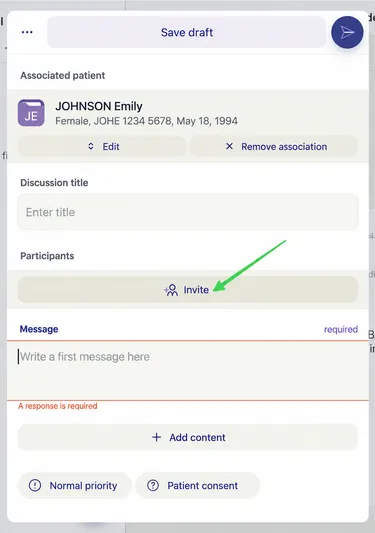
-
To invite a team, click on the workplace of the team in question.
Section titled “To invite a team, click on the workplace of the team in question.”
-
Under the workplace name, click Add to Discussion.
Section titled “Under the workplace name, click Add to Discussion.”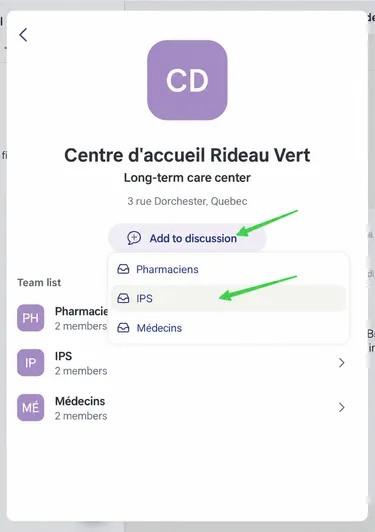
-
Select the desired team.
Section titled “Select the desired team.” -
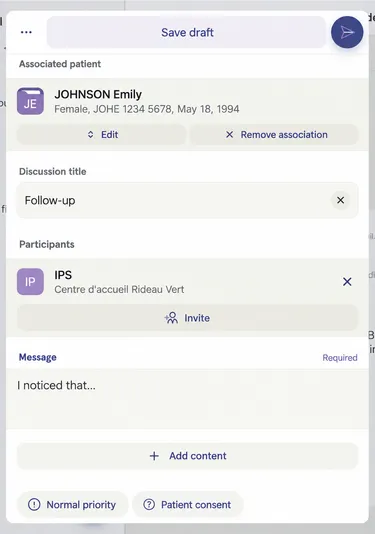
Here we can see that the IPS team has been selected (see orange box).
Section titled “Here we can see that the IPS team has been selected (see orange box).”Finish writing your message and send it by clicking here.