Create Thread Templates
Prepare ready-to-send discussion threads in a trajectory: thread title, first message and actors to include.
Thread templates let you quickly create a discussion thread in a care channel. They can include a title, a first message and the participants to include and notify.
Since a thread template is addressed to the trajectory’s actors, configure the actors first.
Create a Thread Template
Section titled “Create a Thread Template”-
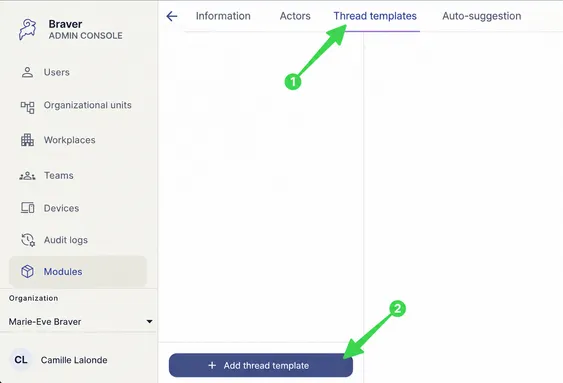
In the trajectory, select Thread templates, then click Add thread template.
-
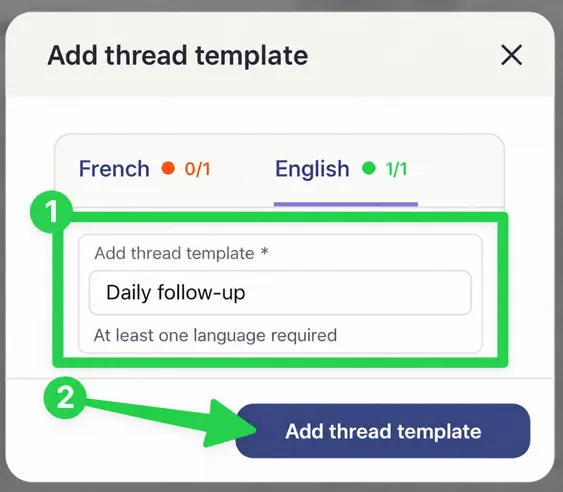
Name the template, then click Add thread template.
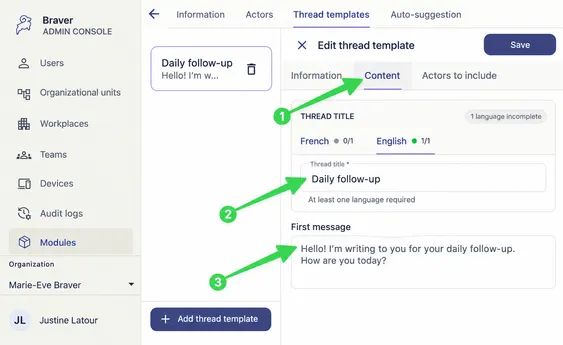
The template is then configured in three tabs: Information, Content and Actors to include.
Information Tab
Section titled “Information Tab”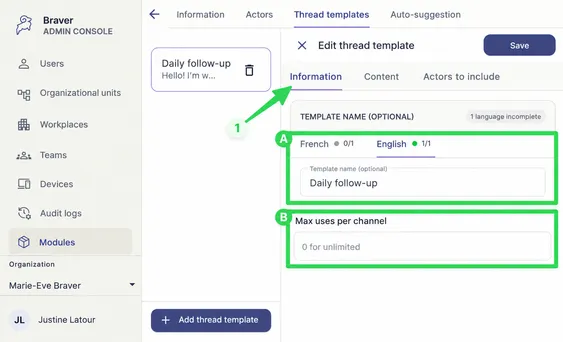
| Marker | Option | Description |
|---|---|---|
| A | Template name (optional) | Used in the admin console to identify the template. It isn’t shown as the thread title. |
| B | Max uses per channel | Set the maximum number of times this template can be used in one care channel. Use 0 for no limit. |
Content Tab
Section titled “Content Tab”Fill in the Thread title and the First message.
Actors to Include Tab
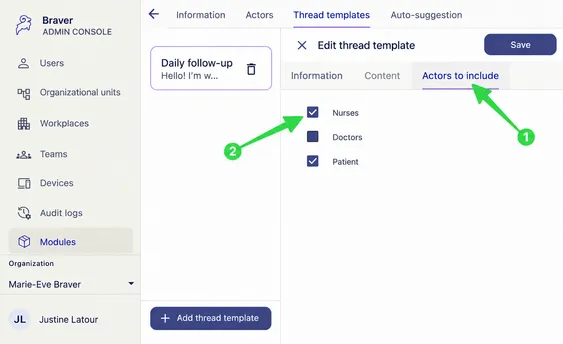
Section titled “Actors to Include Tab”Check the actors to include and notify when this discussion thread is sent.